

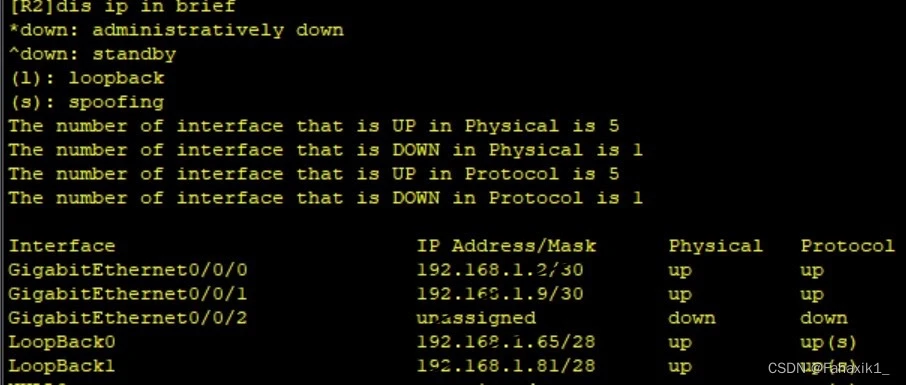
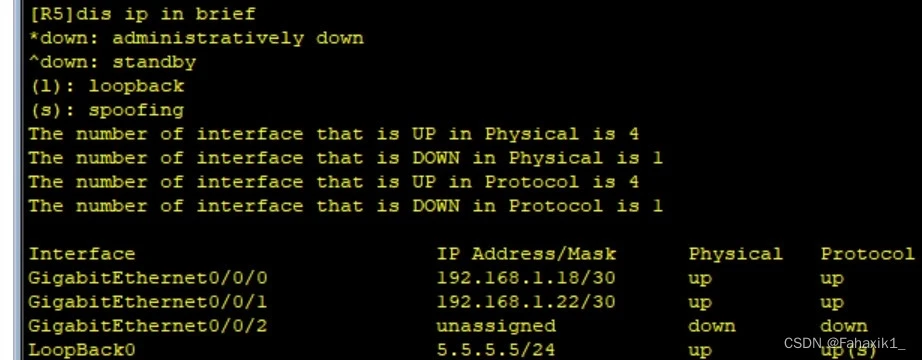
1、划分IP,并给相应设备配置IP地址。观整个网络拓扑(包括环回网段,考虑汇总),可划分为5个大的网段。
[Huawei]sysname R1 [R1]int g0/0/0配置地址 [R1-GigabitEthernet0/0/0]ip add [R1-GigabitEthernet0/0/0]ip address 192.168.1.1 30 [R1-GigabitEthernet0/0/0]qu [R1]int g0/0/1 [R1-GigabitEthernet0/0/1]ip add [R1-GigabitEthernet0/0/1]ip address 192.168.1.5 30
[Huawei]sys [Huawei]sysname R3 [R3]int g0/0/0 [R3-GigabitEthernet0/0/0]ip add [R3-GigabitEthernet0/0/0]ip address 192.168.1.6 30 [R3-GigabitEthernet0/0/0]q [R3]int g0/0/1 [R3-GigabitEthernet0/0/1]ip ad [R3-GigabitEthernet0/0/1]ip address 192.168.1.13 30 [R3-GigabitEthernet0/0/1]q [R3]int l0 [R3-LoopBack0]ip ad [R3-LoopBack0]ip address 192.168.1.97 28 [R3-LoopBack0]q [R3]int l1 [R3-LoopBack1]ip add [R3-LoopBack1]ip address 192.168.1.113 28
Huawei]sys [Huawei]sysname R2 [R2]int g0/0/0 [R2-GigabitEthernet0/0/0]ip add [R2-GigabitEthernet0/0/0]ip address 192.168.1.2 30 [R2-GigabitEthernet0/0/0]q [R2]int g0/0/1 [R2-GigabitEthernet0/0/1]ip add [R2-GigabitEthernet0/0/1]ip address 192.168.1.9 30 [R2-GigabitEthernet0/0/1]q [R2]int l0 [R2-LoopBack0]ip ad [R2-LoopBack0]ip address 192.168.1.65 28 [R2-LoopBack0]q [R2]int l1 [R2-LoopBack1]ip add [R2-LoopBack1]ip address 192.168.1.81
R4]int g0/0/0 [R4-GigabitEthernet0/0/0]ip add [R4-GigabitEthernet0/0/0]ip address 192.168.1.14 30 [R4-GigabitEthernet0/0/0]q [R4]int g0/0/1 [R4-GigabitEthernet0/0/1]ip add [R4-GigabitEthernet0/0/1]ip address 192.168.1.10 30 [R4-GigabitEthernet0/0/1]q [R4]int g0/0/2 [R4-GigabitEthernet0/0/2]ip add [R4-GigabitEthernet0/0/2]ip address 192.168.1.17 30 [R4-GigabitEthernet0/0/2]q [R4]int g4/0/0 [R4-GigabitEthernet4/0/0]ip add [R4-GigabitEthernet4/0/0]ip address 192.168.1.21 30 [R4-GigabitEthernet4/0/0]q [R4]int l0 [R4-LoopBack0]ip add [R4-LoopBack0]ip address 192.168.1.129 28 [R4-LoopBack0]q [R4]int l1 [R4-LoopBack1]ip add [R4-LoopBack1]ip address 192.168.1.145 28
[R5]int g0/0/0 [R5-GigabitEthernet0/0/0]ip add [R5-GigabitEthernet0/0/0]ip address 192.168.1.18 30 [R5-GigabitEthernet0/0/0]q [R5]int g0/0/1 [R5-GigabitEthernet0/0/1]ip add [R5-GigabitEthernet0/0/1]ip address 192.168.1.22 30 [R5-GigabitEthernet0/0/1]q [R5]int l0 [R5-LoopBack0]ip add [R5-LoopBack0]ip add [R5-LoopBack0]ip address 5.5.5.5 24
[R1]ip route-static 0.0.0.0 0 192.168.1.6 [R1]ping 5.5.5.5 [R1]ip route-static 192.168.1.32 27 null 0
4、防环,做黑洞路由配置
5、通过改变路由条目优先级实现,并观察静态路由表变化
6、测试,观察1000Mb/s链路故障时,数据能否走100Mb/s链路。
配置路由条目
[R1]ip route-static 192.168.1.80 30 192.168.1.2 [R1]ip route-static 192.168.1.128 27 192.168.1.2 [R1]ip route-static 192.168.1.128 27 192.168.1.6 [R1]ip route-static 192.168.1.16 30 192.168.1.2 [R1]ip route-static 192.168.1.16 30 192.168.1.6 [R1]ip route-static 192.168.1.12 30 192.168.1.6 [R1]ip route-static 192.168.1.96 27 192.168.1.6 [R1]ip route-static 192.168.1.64 27 192.168.1.2 [R1]ip route-static 0.0.0.0 0 192.168.1.2
R2]ip route-static 192.168.1.16 30 192.168.1.10 [R2]ip route-static 192.168.1.12 30 192.168.1.10 [R2]ip route-static 192.168.1.96 27 192.168.1.10 [R2]ip route-static 192.168.1.96 27 192.168.1.1 [R2]ip route-static 192.168.1.4 30 192.168.1.1 [R2]ip route-static 192.168.1.32 27 192.168.1.1 [R2]ip route-static 0.0.0.0 0 192.168.1.10 [R2]ip route-static 192.168.1.64 27 null 0 [R3]ip route-static 192.168.1.32 27 192.168.1.5 [R3]ip route-static 192.168.1.0 30 192.168.1.5 [R3]ip route-static 192.168.1.64 27 192.168.1.5 [R3]ip route-static 192.168.1.64 27 192.168.1.14 [R3]ip route-static 192.168.1.8 30 192.168.1.14 [R3]ip route-static 192.168.1.128 27 192.168.1.14 [R3]ip route-static 192.168.1.16 30 192.168.1.14 [R3]ip route-static 0.0.0.0 0 192.168.1.14 [R3]ip route-static 192.168.1.96 27 null 0
R4]ip route-static 192.168.1.96 27 192.168.1.13 [R4]ip route-static 192.168.1.4 30 192.168.1.13 [R4]ip route-static 192.168.1.32 27 192.168.1.13 [R4]ip route-static 192.168.1.32 27 192.168.1.9 [R4]ip route-static 192.168.1.0 30 192.168.1.9 [R4]ip route-static 192.168.1.64 27 192.168.1.9 [R4]ip route-static 0.0.0.0 0 192.168.1.18 [R4]ip route-static 192.168.1.128 27 null 0 [R4]ip route-static 0.0.0.0 0 192.168.1.22 pre
[R5]ip route-static 192.168.1.32 27 192.168.1.17 [R5]ip route-static 192.168.1.64 27 192.168.1.17 [R5]ip route-static 192.168.1.96 27 192.168.1.17 [R5]ip route-static 192.168.1.128 27 192.168.1.17 [R5]ip route-static 192.168.1.0 30 192.168.1.17 [R5]ip route-static 192.168.1.4 30 192.168.1.17 [R5]ip route-static 192.168.1.8 30 192.168.1.17 [R5]ip route-static 192.168.1.12 30 192.168.1.17 [R5]ip route-static 192.168.1.32 27 192.168.1.21
浮动静态 [R5]ip route-static 192.168.1.32 27 192.168.1.21 preference 61 [R5]ip route-static 192.168.1.64 27 192.168.1.21 pre [R5]ip route-static 192.168.1.64 27 192.168.1.21 preference 61 [R5]ip route-static 192.168.1.96 27 192.168.1.21 pre [R5]ip route-static 192.168.1.96 27 192.168.1.21 preference 61 [R5]ip route-static 192.168.1.128 27 192.168.1.21 pre [R5]ip route-static 192.168.1.128 27 192.168.1.21 preference 61 [R5]ip route-static 192.168.1.0 30 192.168.1.21 pre [R5]ip route-static 192.168.1.0 30 192.168.1.21 preference 61 [R5]ip route-static 192.168.1.4 30 192.168.1.21 pre [R5]ip route-static 192.168.1.4 30 192.168.1.21 preference 61 [R5]ip route-static 192.168.1.8 30 192.168.1.21 pre [R5]ip route-static 192.168.1.8 30 192.168.1.21 preference 61 [R5]ip route-static 192.168.1.12 30 192.168.1.21 pre [R5]ip route-static 192.168.1.12 30 192.168.1.21 preference 61 [R5]

版权声明:
本文来自互联网用户投稿,该文观点仅代表作者本人,不代表本站立场。本站仅提供信息存储空间服务,不拥有所有权,不承担相关法律责任。
如若内容造成侵权、违法违规、事实不符,请将相关资料发送至xkadmin@xkablog.com进行投诉反馈,一经查实,立即处理!
转载请注明出处,原文链接:https://www.xkablog.com/jszy-jszl/21911.html