

目录
- 一、简介
- 1. 定义
- 2. 版本和变化
- 3. 部署说明
- 二、服务端
- 1. 关闭防火墙
- 2. 安装 nfs
- 3. 配置说明
- 4. 配置共享目录
- 5. 启动服务
- 6. 确认启动成功
- 三、Linux 客户端
- 1. 安装 nfs
- 2. 启动 rpcbind
- 3. 挂载
- 4. 自动挂载
- 5. 解挂
- 四、Windows 客户端
- 1. 打开NFS服务
- 2. 挂载
- 3. 查看
- 4. 修改权限
- 5. 解挂
1. 定义
NFS (Network File System),最初由 Sun Microsystems 于1984年开发的分布式系统协议,允许客户端上的用户通过网络访问文件,其方式与访问本地存储的方式类似。基于 Open Network Computing Remote Procedure Call (ONC RPC) 协议,NFS 是通过 Request for Comments(RFC) 定义的开放标准,允许任何人实现该协议。
2. 版本和变化
3. 部署说明
本文描述如何在 CentOS 7 上安装 NFS,并在 Linux 和 Windows 下使用 NFS 客户端进行连接。
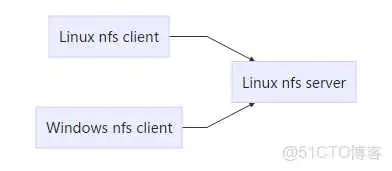
1. 关闭防火墙
2. 安装 nfs
3. 配置说明
通过文件 来对 NFS 进行配置。
It follows the following syntax rules:
- Comments start with the hash mark (#).
- Blank lines are ignored by default.
- Each host’s options must be placed in parentheses directly after the host identifier, without any spaces separating the host and the first parenthesis.
- Each exported file system should be on its own individual line.
- A list of authorized hosts needs to be separated by space characters.
- Long lines can be wrapped with a backslash ().
NFS export default options are:
- : The exported file system is read-only and remote hosts cannot make any changes to the files shared on the file system. To allow hosts to make both reads and writes, specify the option instead.
- : Aith this option, NFS server does not reply to requests before changes made by previous requests are written to disk. To enable asynchronous writes instead, specify the option .
- : This prevents root users that connect remotely from having root privileges. Instead, the NFS server will assign them the user ID nfsnobody. This effectively “squashes” the power of the remote root user to the lowest local user, preventing possible unauthorized writes on the remote server. To disable root squashing, specify .
- To squash every remote user (including root), use . To specify the user and group IDs that the NFS server should assign to remote users from a particular host, use the and options.
- : This reduces disk write overhead by delaying writing to the disk if it suspects another write request is imminent. This can be disabled using , when default sync is on.
- : This option enables subtree checking. It can be disabled using .
4. 配置共享目录
(2)使配置生效
(3)查看 exports
5. 启动服务
(1)启动 rpcbind
(2)启动 nfs-server
6. 确认启动成功
1. 安装 nfs
2. 启动 rpcbind
3. 挂载
创建目录
挂载 nfs,-o 指定版本
查看挂载结果
4. 自动挂载
磁盘被手动挂载之后,需要把挂载信息写入 这个文件中,否则下次开机启动时仍然需要重新挂载。
例如对于 NFSv3,修改
执行挂载命令
查看挂载结果
5. 解挂
1. 打开NFS服务
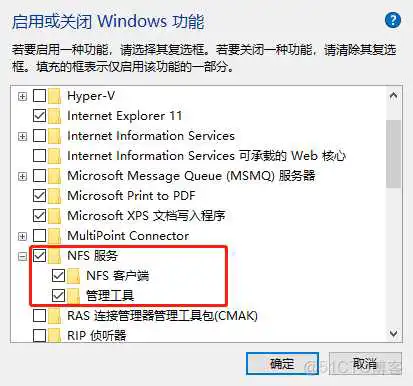
(2)通过命令提示符显示 NFS 服务器
2. 挂载
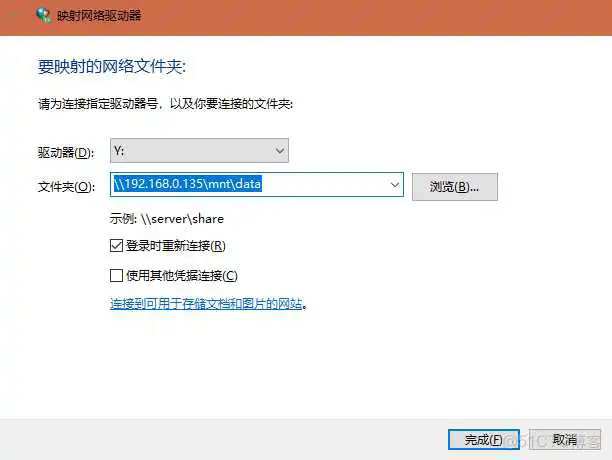
方法2:通过命令挂载
3. 查看
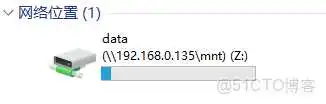
方式2:通过命令查看
4. 修改权限
对挂载盘进行写操作时,提示权限不足!
5. 解挂
到此这篇win nfs客户端(win7 nfs客户端)的文章就介绍到这了,更多相关内容请继续浏览下面的相关推荐文章,希望大家都能在编程的领域有一番成就!
版权声明:
本文来自互联网用户投稿,该文观点仅代表作者本人,不代表本站立场。本站仅提供信息存储空间服务,不拥有所有权,不承担相关法律责任。
如若内容造成侵权、违法违规、事实不符,请将相关资料发送至xkadmin@xkablog.com进行投诉反馈,一经查实,立即处理!
转载请注明出处,原文链接:https://www.xkablog.com/hd-yjs/41649.html