

当一个文件在 Windows 和 Linux 上交替操作后,经常遇到一些莫名其妙的问题,如 shell 脚本无法执行,找不到 shell 脚本等问题,本文谨就这一问题做一总结,供各位参考;
格式差异
换行符是行尾 (EOL),是一个特殊的字符或字符序列,表示一行文本的结尾和新行的开头;
表示换行符的实际代码因操作系统而异:-- Microsoft Windows,DOS(MS-DOS,PC DOS 等)使用 CR + LF;-- Unix 和类 Unix 系统使用,包括 Linux,OS X,FreeBSD 等使用 LF;-- MAC 系统里,使用 CR;
CR 即 ASCII 码的 0x0D( ),LF 为 ASCII 码的 0x0A( ),DOS 下使用( ),类 Unix 系统下使用( ),DOS 系统下的' '在类 Unix 系统下会被显示为 ^M。
后文仅以 test-dos.sh 文件为例来说明,具体内容如下:
#!/bin/bash echo "Hello World !"
格式影响
直观影响
Unix/Mac 系统下的文件在 Windows 里打开的话,所有文字会变成一行(由于 Windows 下编辑器的处理,这种情况一般不会发生);
而 Windows 里的文件在 Unix/Mac 下打开的话,在每行的结尾可能会多出一个 ^M 符号;
功能影响
在 windows 上编写的 shell、python 等脚本在 Linux 上⽆法正常的执⾏,会有 ^M 相关提⽰:
[qxhgd@localhost crlf]$ https://www.elecfans.com/emb/test-dos.sh -bash: https://www.elecfans.com/emb/test.sh: /bin/bash^M: bad interpreter: No such file or directory
如果在 make 编译的时候,执行 mksh(一个 shell 文件)可能会有类似下面的提示:
make[3]: https://www.elecfans.com/emb/mksh: Command not found
格式查看
Windows 下查看
利用编辑器,如 Visual Studio Code、UltraEdit、Notepad2 等软件,如在状态栏显示为 CR+LF 则为 Windows 格式,如果显示为 LF 则为 Linux 格式:

利用支持扩展搜索的编辑器,如 Notepad++,查找 r :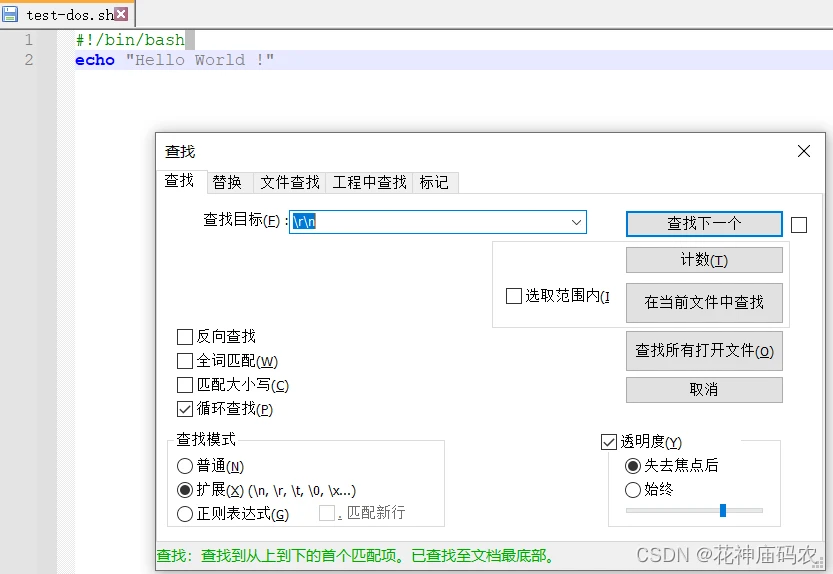
Linux 下查看
cat 命令 显示 ^M:
[qxhgd@localhost crlf]$ cat -v test-dos.sh #!/bin/bash^M echo "Hello World !"^M
显示 Tab:
[qxhgd@localhost crlf]$ cat -T test-dos.sh #!/bin/bash ^Iecho "Hello World !"
od 命令 od 可以单独使用:
[qxhgd@localhost crlf]$ od -c test-dos.sh 0000000 # ! / b i n / b a s h e c h 0000020 o " H e l l o W o r l d ! 0000040 " 0000041
也可以和 cat 配合使用:
cat test-dos.sh| od -c
hexdump 命令
[qxhgd@localhost crlf]$ hexdump -c test-dos.sh 0000000 # ! / b i n / b a s h e c h 0000010 o " H e l l o W o r l d ! 0000020 " 0000021
vim
状态栏下会显示:
"test-dos.sh" [noeol][dos] 2L, 33B
命令模式下执行 set ff:
fileformat=dos
gedit
-- 首先使用 gedit 打开文件:
[qxhgd@localhost crlf]$ gedit test-dos.sh
-- 搜索 r ,如果搜索到了就表示是 DOS 格式:
格式修改
Windows 下
可以利用编辑器修改,如 Visual Studio Code,点击状态栏右下方的 CRLF,选择 “行尾序列” 可修改为 LF 的格式;
有的编辑器,如 Notepad2,有 Line Endings 可供选择: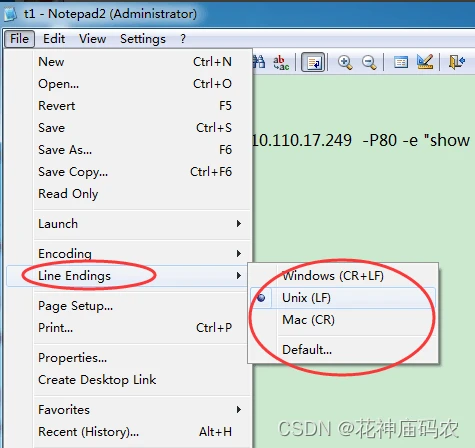
利用支持扩展搜索的编辑器,如 Notepad++,可将 r 替换掉: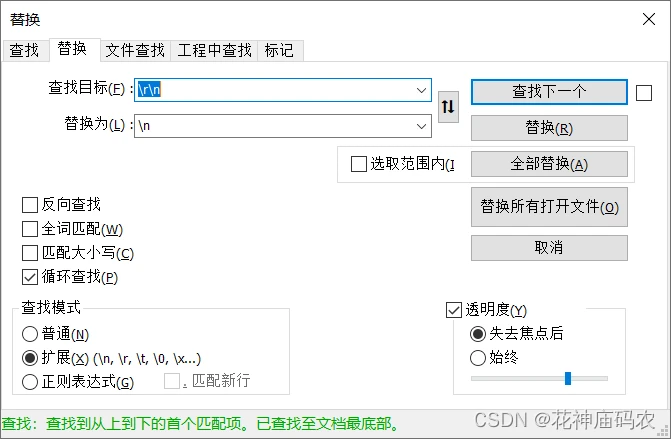
Linux 下
利用特殊工具转换
vim vim 命令模式下,执行 set ff=unix 或 set fileformat=unix 即可将 DOS 格式转换为 unix 格式;
dos2unix 需要额外用命令安装,一般的 Linux 系统不带的;unix2dos 与 dos2unix 作用正相反。
[qxhgd@localhost crlf]$ dos2unix test-dos.sh dos2unix: converting file test-dos.sh to Unix format ... [qxhgd@localhost crlf]$ dos2unix -n test-dos.sh test-unix.sh dos2unix: converting file test-dos.sh to file test-unix.sh in Unix format ...
tofrodos 这一组一共两个命令,todos 和 fromdos,fromdos 用来将 dos 转换成 unix 格式,todos 是用于将 unix 转换成 dos 格式的,使用例子如下:
[qxhgd@localhost crlf]$ fromdos test-dos.sh
利用文本处理工具
sed
-- 转换一个文件:
sed ‘s/^M//’ test-dos.sh> test-unix.sh
-- 转换多个文件:
find https://www.elecfans.com/emb/ -type f print0 | xargs -0 sed -i 's/^M$//'
vi
其中 ^M 必须是同时按 Ctrl+V+M(按住 Ctrl 键,然后依次 V、M 键) 或依次按 Ctrl + V 然后 Ctrl + M,表示回车。
tr
tr -d "�15" test-dos.sh cat test-dos.sh|tr -d ‘/r' > test-unix.sh tr -d ' ' < test-dos.sh > test-unix.sh
perl
cat test-dos.sh | perl -pe ‘~s/ //g’ > test-unix.sh perl -p -e 's/ //g' test-dos.sh> test-unix.sh perl -pi -e 's/ / /g' test-dos.sh
审核编辑:汤梓红
到此这篇dos改成unix(dos/windows与unix/linux文件转换)的文章就介绍到这了,更多相关内容请继续浏览下面的相关推荐文章,希望大家都能在编程的领域有一番成就!版权声明:
本文来自互联网用户投稿,该文观点仅代表作者本人,不代表本站立场。本站仅提供信息存储空间服务,不拥有所有权,不承担相关法律责任。
如若内容造成侵权、违法违规、事实不符,请将相关资料发送至xkadmin@xkablog.com进行投诉反馈,一经查实,立即处理!
转载请注明出处,原文链接:https://www.xkablog.com/bcyy/21012.html